# Build an AI agent interface in React
By Danylo Pravda, 2026-10-08
An agent's interface is more than a chat box. The agent thinks, calls tools, proposes a plan, stops to ask before it
acts, cites what it read and streams an answer that is still arriving. Each of those moments needs its own part, and
each one fails in its own way when it is built from a generic message bubble. Beamline has seventeen AI parts and a
whole workspace screen. This guide maps the moments to the parts.
## The moments, and the part for each
| moment | part | not for |
|---|---|---|
| the answer, streaming or settled | [Response](https://beamline.io/components/response) | short answers with numbered sources: [citations](https://beamline.io/components/citations) |
| what the agent did while thinking | [Reasoning](https://beamline.io/components/reasoning) | tool calls with inputs and outputs: [tool call](https://beamline.io/components/tool-call) |
| one tool call, as it runs | [Tool call](https://beamline.io/components/tool-call) | a plan approved up front: [plan](https://beamline.io/components/plan) |
| multi-step work before and while it runs | [Plan](https://beamline.io/components/plan) | background jobs: [task rows](https://beamline.io/components/task-rows) |
| permission before an action with side effects | [Approval card](https://beamline.io/components/approval-card) | a suggestion to take or leave: [recommendation card](https://beamline.io/components/recommendation-card) |
| an answer grounded in documents | [Citations](https://beamline.io/components/citations) | the retrieved chunks in full: [context cards](https://beamline.io/components/context-cards) |
| the composer | [Prompt bar](https://beamline.io/components/prompt-bar) | people chatting with people: [chat thread](https://beamline.io/components/chat-thread) |
| the scrolling column | [Conversation](https://beamline.io/components/conversation) with [Message](https://beamline.io/components/message) | a feed of events: [timeline](https://beamline.io/components/timeline) |
The "not for" column is the part that saves the most rework: it is what an agent building your UI reads before it picks.
## Streamed answers that do not jump
Tokens arrive in bursts. Rendered as they come, an answer stutters, a word drops to the next line and back as the next
one lands, and a table resizes its columns row by row. [Response](https://beamline.io/components/response) renders markdown that is still
arriving: bursty tokens flow in at an even pace, each new word fades in, paragraphs that are still streaming wrap
without hopping, and a table lands whole. You pass the text received so far and a `streaming` flag:
```tsx
import { Response } from "@beamline/response";
{text}
```
## Showing the work: reasoning and tool calls
[Reasoning](https://beamline.io/components/reasoning) is the agent's trace, fed by your stream: a working label with the seconds so far
while it thinks ("Searching… 3s"), then "Thought for N seconds", with the steps folded away and one press to open
them. A closed trace is out of the tab order, so keyboard users are not walked through work they did not ask to see.
[Tool call](https://beamline.io/components/tool-call) is one call on one quiet row: its status, what it did and a short result, opening to
the exact input and output. When a call needs the person's permission before it runs, the same row waits with Allow
and Deny (`onApprove`, `onDeny`).
## Asking before acting: plans and approvals
Two parts cover the moment an agent must stop:
- [Plan](https://beamline.io/components/plan) is multi-step work: numbered steps with live status and progress, and Approve, Edit or
Reject while it waits (`awaitingApproval`). After approval it shows the steps running.
- [Approval card](https://beamline.io/components/approval-card) is one action with side effects (send, update, delete): what the agent
wants to do, exactly what that changes, any questions it needs answered, and Approve or Reject. Number keys pick an
answer, and ⌘ or Ctrl+Enter approves once every required question is answered.
Neither one does the action. They call your handlers, and the screen shows what your backend reports.
## The composer
[Prompt bar](https://beamline.io/components/prompt-bar) is the agent's input: it grows with the text, `@` adds a source, `/` at the start
opens commands, there is a model picker, files and dictation, and one button that sends and then stops a running
answer. Enter sends, Shift+Enter starts a new line, and typing in a language with an input method never sends by
accident. When sending is refused (a quota, a permission), the draft stays.
## Or start from the whole workspace
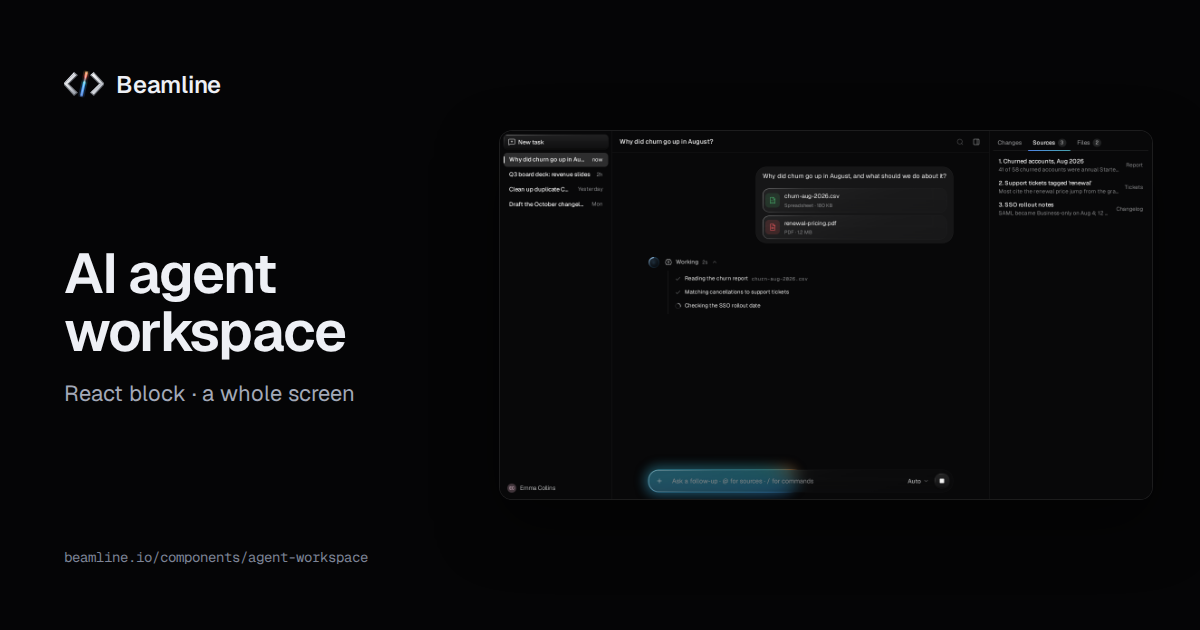
The [agent workspace](https://beamline.io/components/agent-workspace) block puts it together for a product where the model plans, asks
before acting and produces things people review: threads, a conversation with streamed reasoning, cited answers and a
plan that waits for approval and then runs step by step, and an artifacts panel for the changes it made. You pass the
run and the handlers:
```tsx
import { AgentWorkspace } from "@beamline/agent-workspace";
```
For a small help widget, the workspace is too much: a [conversation](https://beamline.io/components/conversation),
[messages](https://beamline.io/components/message) and a [prompt bar](https://beamline.io/components/prompt-bar) are enough. Person-to-person chat has its
own part, the [chat thread](https://beamline.io/components/chat-thread), and a voice agent has the [voice agent](https://beamline.io/components/voice-agent)
screen.
## Ask your agent for it
With Beamline connected ([setup for your agent](https://beamline.io/connect)), describe the product rather than the widgets: "a research
copilot that searches our docs, shows what it read, cites its answers and asks before it files a ticket". The agent
maps each moment to its part, installs them, and wires them to your model's stream. How streaming text plugs in is in
[Connect your data](https://beamline.io/docs/data-integration).