Guide · By Danylo Pravda · Updated
Build a data grid and CRM screen in React
Any product with records (deals, orders, users, tickets, logs) ends up with a grid people work through all day. A table that is fine with twenty rows falls apart at five thousand: scrolling stutters, sorting freezes, editing a cell means opening a form. Beamline's data grid is built for the five thousand, and the CRM block is a whole pipeline screen on top of it. This guide covers both.
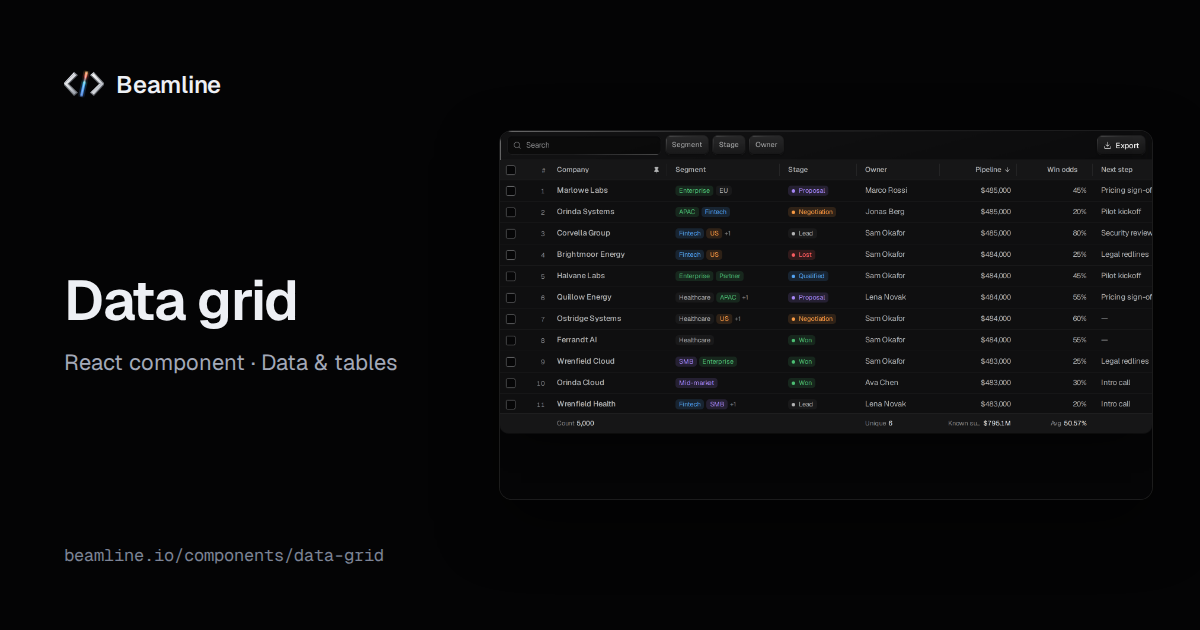
The grid
import { DataGrid, type DataGridColumn } from "@beamline/data-grid";

const columns: DataGridColumn<Deal>[] = [
  { id: "name", header: "Deal", pinned: true, sortable: true, editable: true },
  { id: "stage", header: "Stage", type: "status", filterable: true },
  { id: "amount", header: "Amount", type: "currency", sortable: true, aggregate: "sum" },
  { id: "probability", header: "Probability", type: "percent", aggregate: "avg" },
  { id: "closeDate", header: "Close date", type: "date", sortable: true },
  { id: "tags", header: "Tags", type: "tags" },
];

<DataGrid
  data={deals}
  columns={columns}
  getRowId={(d) => d.id}
  onCellEdit={(rowId, columnId, value) => api.patch(`/deals/${rowId}`, { [columnId]: value })}
/>
Columns have a type (text, number, currency, percent, date, status, tags) that sets how a cell is drawn,
formatted, sorted and edited. On top of that:
- Thousands of rows: the grid is virtualised, so only the rows in view exist in the page.
- Sort and filter: multi-column sort, a search over every column, and value filters built from each column's distinct values.
- Shape the view: resizable columns, pinned columns on the start edge, row numbers, density.
- Edit in place: double-click, Enter, F2 or just typing starts an edit; Enter commits, Escape cancels, Tab commits
and moves on. Your
onCellEditgets the row, the column and the value. - Select and total: range selection, and footer aggregates per column (count, sum, average, minimum, maximum, unique).
Sort, filters, search and selection each come in both forms (sort / defaultSort / onSortChange and so on), so the
grid can own them or your URL can.
Missing cells say so
A cell with no value is not drawn as 0 or as an empty string. It shows the column's nullLabel, and the footer's
totals say how many rows they cover, so an average over half the rows does not pass for an average over all of them.
The keyboard is the fast way
The grid is one tab stop with the whole keyboard model inside: arrows move between cells, Home and End go to the row's edges, Ctrl+Home and Ctrl+End to the grid's corners, Page Up and Page Down by a screen. People who live in a grid stop reaching for the mouse.
Measured, not assumed
Scrolling 5,000 rows is in Beamline's speed bench. Its first run found the footer totals recomputed over every row on every render, three renders per scroll step; memoising them cut scrolling's main-thread time by 18.7 % with nothing else changing (the measurements).
The CRM screen
The CRM block is a pipeline built on the grid: KPIs and the stage mix are derived from the deals,
the grid takes inline edits, bulk moves and deletes with undo, and a row opens the deal in a side sheet with a stage
stepper, fields and notes, while the list stays in view. Every change goes to your onDealsChange:
import { Crm } from "@beamline/crm";

<Crm deals={deals} onDealsChange={(next) => save(next)} owners={owners} me={me} />
It fits any record-heavy B2B screen: deals, accounts, tickets, orders. Enter on a row opens it, Escape closes the sheet and returns focus to the row, and a delete asks first, with Escape to back out.
When to use something else
- A handful of static rows in a card: a table, not a grid.
- Fewer than about 50 records people mostly read: an item list.
- Trading positions with live profit and loss: the positions table.
- A read-only report: the analytics dashboard.
Ask your agent for it
With Beamline connected (setup for your agent): "a deals pipeline on our /api/deals with inline editing, stage filters and a detail panel with notes". The agent installs the CRM block (or the grid alone for a simpler list), maps your fields to columns with the right types and wires edits to your API.